


In the video, I build the same small web app twice with the same model, Opus 5.5:
Run A: maximum effort, in one shot.
Run B: medium effort, using free skills and a process.
Both runs got the same prompt and the same starting repo. I scored them with the same 14 checks, which I wrote before either run started. This post covers what I learned, the scorecard, and everything you need to set up Run B yourself.
I assume you already use Claude Code or Codex in a terminal. Nothing here depends on one app. I run my agents in Enjoy, and I point out where that changes things.
What I mean by model maxing
Model maxing is paying for every subscription and running each one into its limit before the weekly reset, then moving to the next. Ultra Max is my name for sending every task to the highest effort setting, on the theory that more thinking means a better result. In Claude Code, that is max.
I did both, and neither paid off. Most of what changed my mind came from NetworkChuck’s interview with Matt Pocock, “How to Actually Code with AI” (20 November 2026, about two hours). All the timestamps below refer to it.
Matt uses one model, generally at medium effort, and doesn’t keep switching (30:00).
High effort makes the agent explore more than the task needs. Reading more files is not better than reading the right ones (30:13 to 32:34).
He saves the higher settings for research, debugging, performance work and checking results (47:05).
Work gets worse as a conversation grows, so keep the work small (25:51).
That last point matched my own records. Most of my usage came from a few very long sessions, because every request sends the whole conversation again. The model wasn’t my problem. My setup was.
The test
The app is Edge Traffic: a page that shows what crosses my home firewall to and from the internet, and where on the internet it goes. It reads the flow data my router already sends to my cluster, and it looks up each remote address in the free DB-IP Lite databases, which sit on my own disk. Both runs got the same prompt, which asks for:
total traffic in and out, in bytes and packets, with a switch between them;
traffic over time;
the top 10 networks, countries and US states;
a map of where the traffic goes;
a time-window picker and auto-refresh every 30 seconds;
a token that never reaches the browser, and no browser requests to other sites;
a switch, on by default, that hides every IP address, including my own WAN address.
The starting repo is public: https://github.com/byrn-baker/edge-traffic. Its sample flows have my WAN address replaced with a documentation address and each remote address replaced with the first address of its DB-IP range, so the tests run without my network. Small DB-IP extracts for those addresses are in the repo too, with DB-IP’s CC BY 4.0 credit.
Run A: Opus 5.5 at max effort. I pasted the prompt and left it alone.
Run B: Opus 5.5 at medium effort, with Matt Pocock’s skills, GitHub Spec Kit and my pocock-workflow skill. I start it with
/grill-with-docs, answer its questions, then hand over to/pocock-workflow, which writes the Spec Kit spec, plan and tasks and builds from them.
Both ran headless in Claude Code, without my personal global instructions file, so neither could hand work to another model.
Neither run saw the 14 checks, which I wrote first. They cover:
that the app starts with the documented command, with the tests passing offline;
that every view has data, and the totals match a direct query;
that the network, country and state lookups match the DB-IP files;
the time windows, the 30-second refresh and the bytes/packets switch;
that the token never reaches the browser, and the browser never calls another site;
that no address appears while hiding is on;
that a bad token produces an error rather than a crash, and malformed requests don’t take the server down;
that the DB-IP credit is on the page;
the look, from desktop and phone screenshots;
a code review of each result.
Tokens are counted from each session’s transcript, including any subagents. Time is wall-clock, from the first prompt to the end of the session.
The scorecard
These are the numbers from the two runs in the video, made on 26 November 2026.
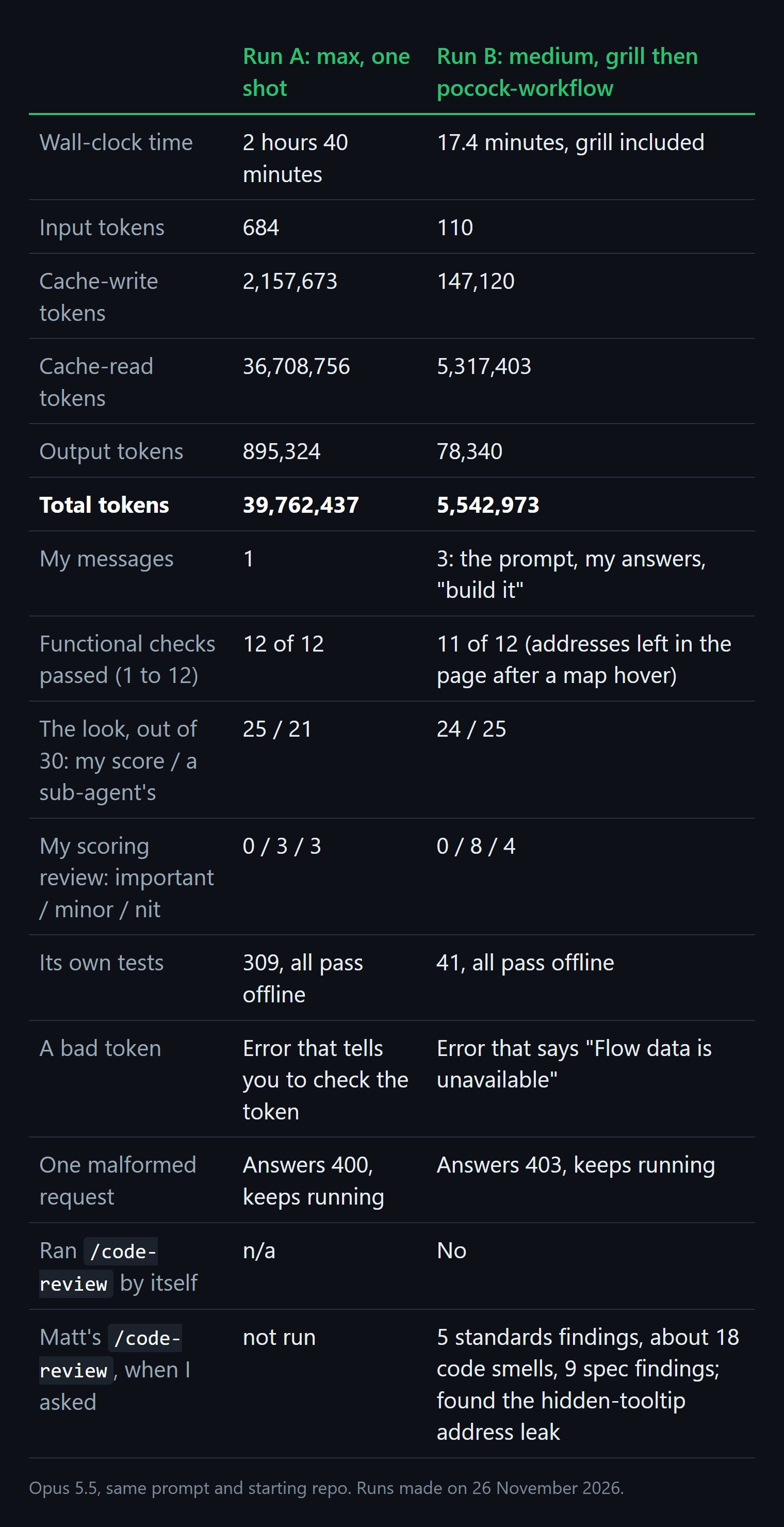
Run B also had a one-off setup before the clock started: specify init, which uses no tokens, and Matt’s setup skill, which used 276,783 tokens. With that included, Run B used 5,819,756 tokens.
What the numbers say. Run B used about 14% of Run A’s tokens (15% with setup) and about a ninth of the time. Run A passed all twelve functional checks and Run B passed eleven. Both:
matched a direct query exactly on the in and out totals;
matched the full DB-IP files on the top five remote addresses;
kept the token out of the browser, and showed no address with hiding on at page load;
made no browser requests to other sites;
gave an error, not a crash, on a bad token.
I also clicked each app’s hide switch in a browser. Both showed addresses on the first click and cleared them from the screen within a second and a half of the second. Run B’s miss is the one its /code-review found (below). If you hover a city on the map while addresses are shown and then turn hiding back on, that city’s addresses stay in the page source inside the hidden tooltip. I confirmed it with real mouse input: 8 addresses were still there 10 seconds later. They weren’t on screen, but anyone who opened the developer tools or saved the page would see them. Run A left none. Run A wrote no files for its first 11 minutes while it thought. Run B wrote its glossary after three and a half minutes.
Where max effort won. Run A did more:
nearly eight times as many tests;
percentages, averages and table views on the page;
a US map alongside the world map;
a bad-token error that tells you what to fix.
It also passed all twelve functional checks, and its scoring review was shorter. Run B’s had more minor findings, including a chart that dips falsely at both ends of the window. That review also rated the map tooltip leak as minor, but it’s the check Run B failed, so I count it as the most serious problem in either build (more below).
On looks, it’s close. A sub-agent scored six screenshots on dark theme, readability, the map, the charts, the phone layout and polish. It picked Run B, 25 to 21, mostly because its map fills each country with colour and its phone layout is cleaner. Run A’s map is a near-uniform grey, and its phone cards wrap badly. I then used both apps myself on the sample data and scored them A 25, B 24: very close, with Run A slightly ahead for me.
What Run B gave me that Run A didn’t. Before it wrote any code, the grill asked 16 questions in one round, each with a recommended answer. They covered:
how to find my WAN address when no setting holds it and it can change;
whether totals are added up in VictoriaLogs or in the app;
what exactly appears when hiding is off;
what to show when Grafana fails.
I accepted all 16 recommendations. The answers went into a glossary and a decision record, and the build used them. Run A made the same kinds of choices on its own.
What /code-review caught. Run B didn’t run Matt’s code-review skill on its own this time, so I asked for it afterwards. I ran it in a copy of the build session at medium effort, with file edits blocked. It took three and a half minutes, ran the tests and the type check (both pass), and sent a standards reviewer and a spec reviewer through the code.
Standards: 5 minor findings and about 18 possible code smells, none of them hard violations. Most were names that drifted from the glossary, or code repeated between the browser and the server.
Spec: it found the most serious problem in either build. Turn hiding off, hover a city on the map, then turn hiding back on: the tooltip disappears, but its addresses stay in the page. The spec says no address appears anywhere on the page.
Spec, also: the newest chart point always reads low, because the last time bucket is only part full.
A false alarm: its top “not asked for” item was the fixed flow stream, which my prompt asked for by name.
What I had to check myself. In my earlier test on a simpler app, Top Talkers, it ran by itself in two of four Run B builds. One malformed request crashed three of those four builds, and /code-review missed it every time it ran. This time neither build crashed, but I only know that because I sent both the same malformed request with a four-line script.
So the process I’m showing ends with two things before you commit. Check that /code-review ran, and if it didn’t, ask for it, because a process only helps when its steps actually run. And keep a few checks that attack the running app, because a code review isn’t a test.
The limits of this test.
It’s one app and one prompt, and each run finished once on Edge Traffic. On Top Talkers, Run B’s tokens varied from 3.7 to 6.5 million across four runs, so expect a spread.
The look scores are two opinions: mine, and one sub-agent’s from six screenshots that showed no empty, error or loading states. We disagreed on the winner by a few points.
My two scoring reviews didn’t run the tests because a permission prompt blocked them, so they come from reading the code. The
/code-reviewrun did run them.I answered the grill by accepting every recommendation. Your answers will take longer than mine did.
The rest of this post is how to set up Run B.
Step 0. The starter stack
Matt’s starter stack is short: Git, GitHub, an editor, and an agent that can use skills (52:55).
git --version
claude --version   # or: codex --version
If your project is not under Git yet, fix that first. Every later step depends on being able to see and undo what the agent changed.
Step 1. Know what a skill is, and where your agent looks
A skill is a folder with a SKILL.md file in it. The top of that file has a description. The agent reads it to decide when the skill applies. The rest is instructions for doing one kind of work well.
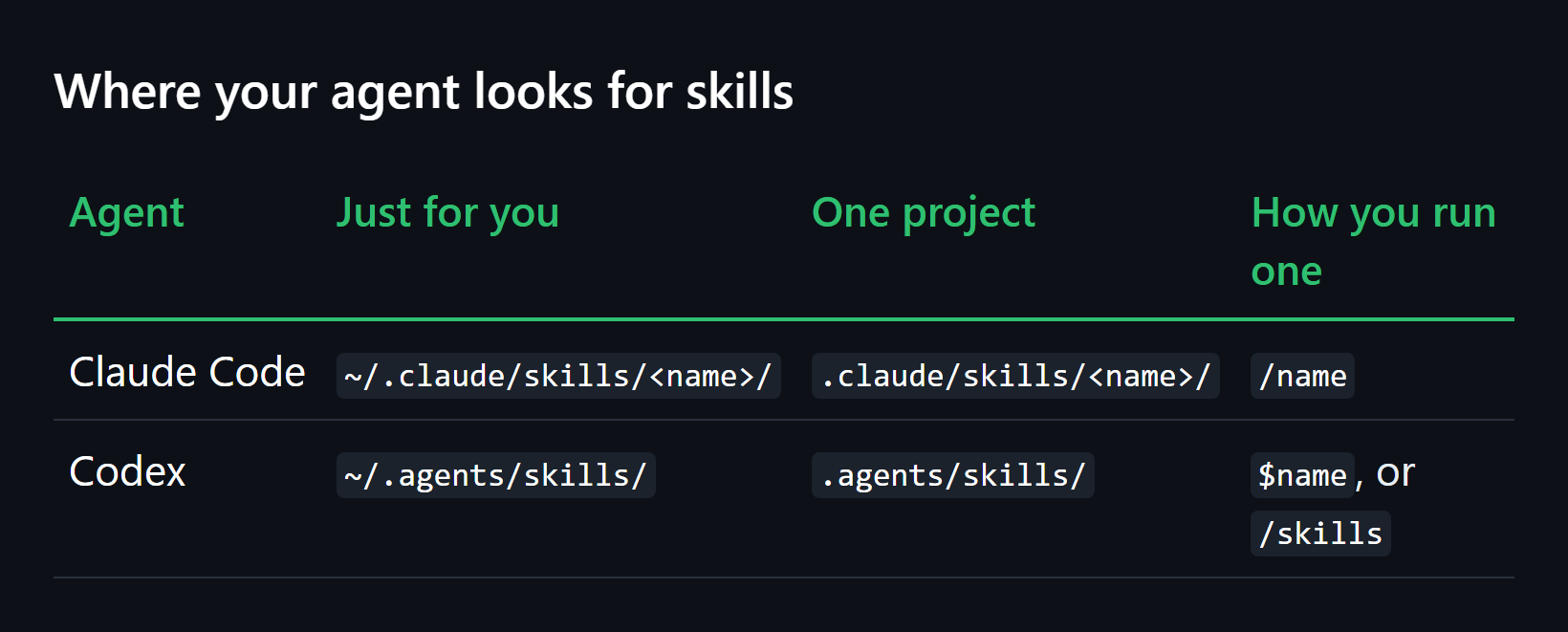
Sources: the Claude Code skills docs and the Codex skills docs.
Skills come in two kinds, and nobody told me this:
User-invoked skills have
disable-model-invocation: truein their frontmatter. The agent will never start them on its own. You have to type them.Model-invoked skills can be picked up by the agent whenever the description fits.
On my machine, 24 of the 43 skills in ~/.claude/skills are user-only. They include grill-with-docs, to-spec, implement and setup-matt-pocock-skills. If a skill “never fires”, check that flag before you decide it is broken.
Step 2. Install the three pieces
Matt Pocock’s skills
Matt Pocock’s skills do the engineering. If you want to know where they come from and how he uses them, start at AI Hero. Its “Start here” and “The Main Flow” pages walk through them in order, and the AI Coding Dictionary explains the vocabulary.
These are the commands I ran on 24 November 2026, each in a fresh, empty profile:
# Claude Code: add Matt's marketplace, then install from it
claude plugin marketplace add mattpocock/skills
claude plugin install mattpocock-skills@mattpocock

# Codex: the same two steps
codex plugin marketplace add mattpocock/skills
codex plugin add mattpocock-skills@mattpocock

# Any agent, as editable files in the current project
npx skills@latest add mattpocock/skills -a claude-code
Each route gave me all 39 skills, at plugin version 1.3.2.
A warning about Claude Code. Matt’s README says claude plugin install mattpocock-skills@claude-plugins-official, and aihero.dev says claude plugins install mattpocock-skills. Neither worked for me in a fresh profile on Claude Code 2.1.331. Both reported that the plugin was not found. Adding Matt’s own marketplace first worked the first time. Commands like these change, so if mine fails for you, check the README.
Pick one route per agent. Installing two gives you every skill twice. The npx route also lets you choose skills with -s, and it ends with a fair warning: review skills before use, because they run with your agent’s full permissions.
GitHub Spec Kit
GitHub Spec Kit keeps the project’s records: a constitution with the project’s rules, then a spec, a plan and a task list for each feature.
uv tool install specify-cli
# then, inside a project:
specify init --here --integration claude
# or, for Codex:
specify init --here --integration codex --integration-options="--skills"
I tested this with Spec Kit 1.3.2. The Claude version put its skills (speckit-specify, speckit-plan, speckit-tasks and the rest) in the project’s .claude/skills, and the Codex version put them in .agents/skills. Unlike Matt’s skills, they live in each project, not in your home folder.
If an agent runs specify init for you, add --non-interactive. Without it, the command waited for an answer that never came, and the agent hung.
pocock-workflow
This is my own skill, and it joins the other two: https://github.com/byrn-baker/pocock-workflow (MIT). Copy its skills/pocock-workflow folder into ~/.claude/skills/ or ~/.agents/skills/.
Check all three: open a fresh session in a project where you have run specify init. Type / and look for grill-with-docs, speckit-specify and pocock-workflow. A file on disk is not proof the agent can use it. The proof is the agent listing it.
Step 3. How Spec Kit and Matt’s skills fit together
I got this wrong at first. Matt’s skills don’t use Spec Kit. They have their own path:
grill-with-docsto clarify;to-specto write the spec;to-ticketsto split it into slices;implementto build them.
Combining that path with Spec Kit is my choice, not his. Here is how I split the work:
Spec Kit keeps the records. The constitution, spec, plan and tasks are the one place that says what we are building.
Matt’s skills do the engineering inside them:
grill-with-docsclarifies the task, and records the project’s terms in a glossary and its decisions as ADRs (12:35 to 24:04);tddbuilds test-first;code-reviewchecks the diff against the repo’s standards and against the spec, as two separate questions (37:28);retrolooks back and suggests changes to the setup (40:18).
pocock-workflow coordinates. You start it and give it the task. It walks the stages in order and uses Spec Kit’s records instead of an issue tracker. Where Matt’s
to-specandto-ticketswould publish to a tracker, it puts their output into the Spec Kit spec and tasks. It also caps each task at 10 attempts, and stops on success, on a real blocker, or at the cap.
Three limits worth knowing:
pocock-workflow can’t start Matt’s user-only skills itself.
grill-with-docsis one of them.It skips the grill when it thinks the task is clear. In my first rehearsal it went straight from the prompt to the spec without asking anything.
Not every stage runs every time. In one rehearsal it wrote the tests alongside the code rather than test-first, and it said so, and it didn’t run
code-revieworretroby itself. In two later rehearsals with the public copy it worked test-first and rancode-reviewby itself.
So I start with /grill-with-docs myself, answer its questions, and then type /pocock-workflow Build it, using the answers we agreed. Before committing, I check that /code-review ran and ask for it if it didn’t. Then I run my own checks against the running app, since in the rehearsals the review missed a crash that one malformed request triggered.
If you’d rather keep things simple, Matt’s skills on their own are a complete workflow. Spec Kit adds records, not capability.
Step 4. A Home Repo, so every project starts the same way
This idea is Matt’s: the Home Repo pattern. In his words, “A Home Repo is one repository that holds your skills, your AGENTS.md and your shared docs. You run your agent in the Home Repo.”
Each project stays its own repo, with its own history, remote and issue tracker.
The Home Repo’s
AGENTS.mdlists each project with its local path and remote, so the agent can open it, or clone it if it’s missing.His setup prompt suggests a new private repo beside your others. Mine is private.
Mine holds:
AGENTS.md: “start agents here”, the shared skills, and a## Projectslist with one line per project.CLAUDE.md: just@AGENTS.md, so Claude Code reads the same file.A
new-projectskill, in both.claude/skillsand.agents/skills, so it runs as/new-projector$new-project.
new-project is how every project starts. It asks four questions: the name, a one-line purpose, which agents, and whether to create a GitHub repo now. Then it:
checks the folder is free, Spec Kit is installed, and the Home Repo has no uncommitted changes;
creates the project beside the Home Repo, runs
specify init --non-interactive, and writes a shortREADME.md,AGENTS.mdandCLAUDE.md;adds the project’s line to the Home Repo’s list and commits it;
creates the GitHub repo, only if you said yes;
tells you to open a fresh session in the new project and run
/setup-matt-pocock-skillsyourself.
Matt’s setup skill asks where your issues live, which labels to use, and where to put its docs. It is user-only, so that last step is always yours.
new-project is in the pocock-workflow repo, under the same MIT licence: https://github.com/byrn-baker/pocock-workflow/tree/main/skills/new-project. Copy it into your Home Repo’s .claude/skills/ and .agents/skills/, and add a ## Projects heading to its AGENTS.md. It creates folders and commits, and can create a GitHub repo, so read it before you run it.
Check: run it once on a scratch project. You should get a new folder with Spec Kit set up, one new line in the Home Repo’s list, and a fresh session in the new project that lists the skills.
Step 5. Pick the model and effort on purpose
This is the whole point of the video. Use one capable model at medium effort, and raise the effort only for debugging and checking results. When the results are bad, change the environment first: the instructions, the glossary, the checks (30:00). When an agent makes a mess, the fix is usually in the setup, not in a bigger model.
Keep sessions small. In Enjoy, switching agents in the middle of a conversation passes the whole conversation along, so it isn’t a clean start. For a clean start, open a new conversation.
Step 6. Make the checks something the agent can’t argue with
Types, tests and lint should run as commands that give the same answer every time, and the agent should never be allowed to skip one (48:33). If you find the agent doing the same check by hand over and over, move it into CI or a script (1:24:15). Every few days, run /improve-codebase-architecture. It looks for places where a simple interface could hide more of the work (55:09).
Step 7. Climb the trust ladder slowly
At the bottom of Matt’s ladder, you review every change (44:28). You give the agent more to do unattended only when its results have earned it. He is also honest that skills are hard to evaluate (1:21:30). Keep a note of which ones actually changed your results.
What I run this in: Enjoy
This is not sponsored. Enjoy is the app I run Claude Code and Codex in. It isn’t a model, and it doesn’t replace them. Everything above works without it. Here is where it helped in this project:
Skills. Type
/in the message box and it lists the skills the agent you picked already has. One skill per message. Enjoy doesn’t install skills; it shows what your agent has. (Run a skill)Docs next to the work. The video plan and the rules for the test are docs in the project, beside the conversations that use them.
Secrets. The Grafana token for the demo is a project secret. The agent used it to pull the sample data, and the value never appeared in the conversation.
Workflows. A workflow is a saved set of instructions. Running it starts an ordinary conversation where the agent follows them. You can run one on demand, on a repeating schedule, or once at a set time. You can also start one from a message: type
@, pick the workflow, and send. (What are workflows, Use workflows in messages)
Workflows belong to one project, and I found no setting that gives new projects default workflows. That’s why the Home Repo is the Enjoy project where I keep a “New project” workflow, which runs the new-project skill. The two test runs are workflows too, so I could rehearse them, write this post from known results, and then run the same steps live for the video.
Enjoy also keeps its own project instructions, but in the app, not in your repo. Anything that should work outside Enjoy goes in AGENTS.md or CLAUDE.md. (Agent instructions)
The checklist
Git and one skill-capable agent are installed.
You know where your agent reads skills from, and which ones only run when you type them.
Matt Pocock’s skills are installed by one route, and a fresh session lists them.
If you use Spec Kit:
specify inithas run in the project, and pocock-workflow is installed.A private Home Repo lists your projects, and new projects start from it.
/setup-matt-pocock-skillshas been run in each project.You use one model at medium effort, in small sessions, and raise the effort on purpose.
Tests, types and lint run as commands, and the agent can’t skip them.
You review every change until the results earn you a step up the ladder.
Links
NetworkChuck and Matt Pocock, “How to Actually Code with AI”
AI Hero: https://www.aihero.dev/skills and the AI Coding Dictionary, https://www.aihero.dev/ai-coding-dictionary
Matt Pocock’s skills: https://github.com/mattpocock/skills
The Home Repo pattern: https://www.aihero.dev/the-home-repo-pattern
GitHub Spec Kit: https://github.com/github/spec-kit
pocock-workflow, which also holds the new-project skill: https://github.com/byrn-baker/pocock-workflow
The test repo, edge-traffic: https://github.com/byrn-baker/edge-traffic
DB-IP Lite, the location databases (CC BY 4.0): https://db-ip.com/db/lite.php
Claude Code skills docs: https://code.claude.com/docs/en/skills
Codex skills docs: https://learn.chatgpt.com/docs/build-skills
Enjoy: https://enjoy.dev and its help, https://enjoy.dev/help/