


TLDR: This is Part 1 of a 10-part series building a full service provider MPLS/EVPN lab (28 devices in CML) with AI-driven monitoring. In this post we deploy Nautobot 3.2.1 with Design Builder, BGP Models, IGP Models, and Golden Config, then populate the entire topology (devices, IPs, cabling, VRFs) in a single idempotent job run. Everything downstream, config generation, monitoring inventories, AI investigation, queries this one source of truth.
What we’re building and why
This series builds a complete service provider network from scratch and then monitors it the way a modern NOC would. An AI agent investigates alerts, correlates state history, and produces root cause analysis without a human touching a CLI.
The network: an MPLS L3VPN core with 3 datacenter customers, each running a leaf-spine EVPN/VXLAN fabric with K3s clusters and distributed applications. 28 devices total: 13 Cisco IOS-XE routers (CAT8000v) and 15 Arista EOS switches (vEOS), all running in CML on Proxmox.
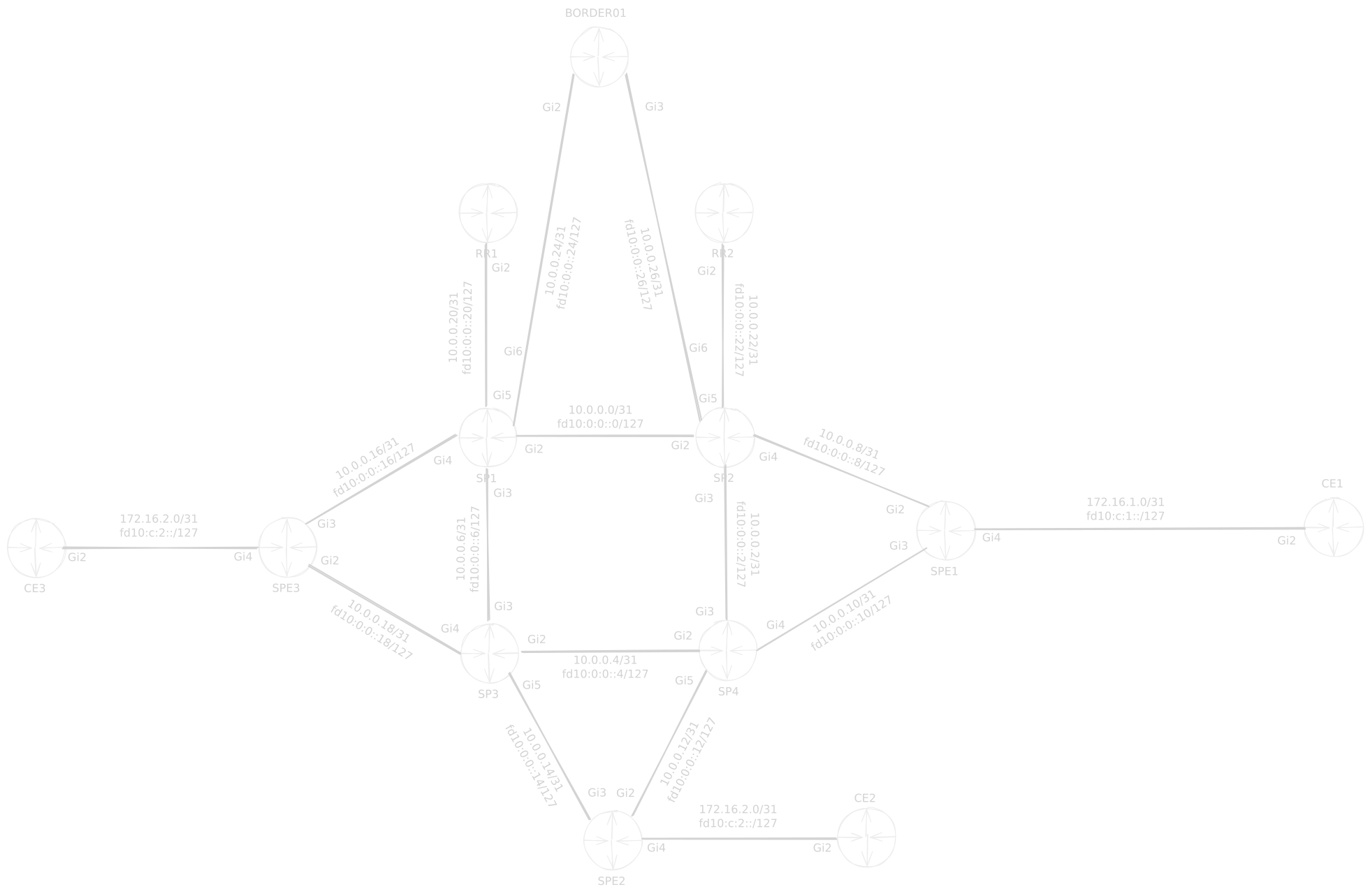
The MPLS L3VPN core: P routers, PE routers, and route reflectors connecting three customer sites.
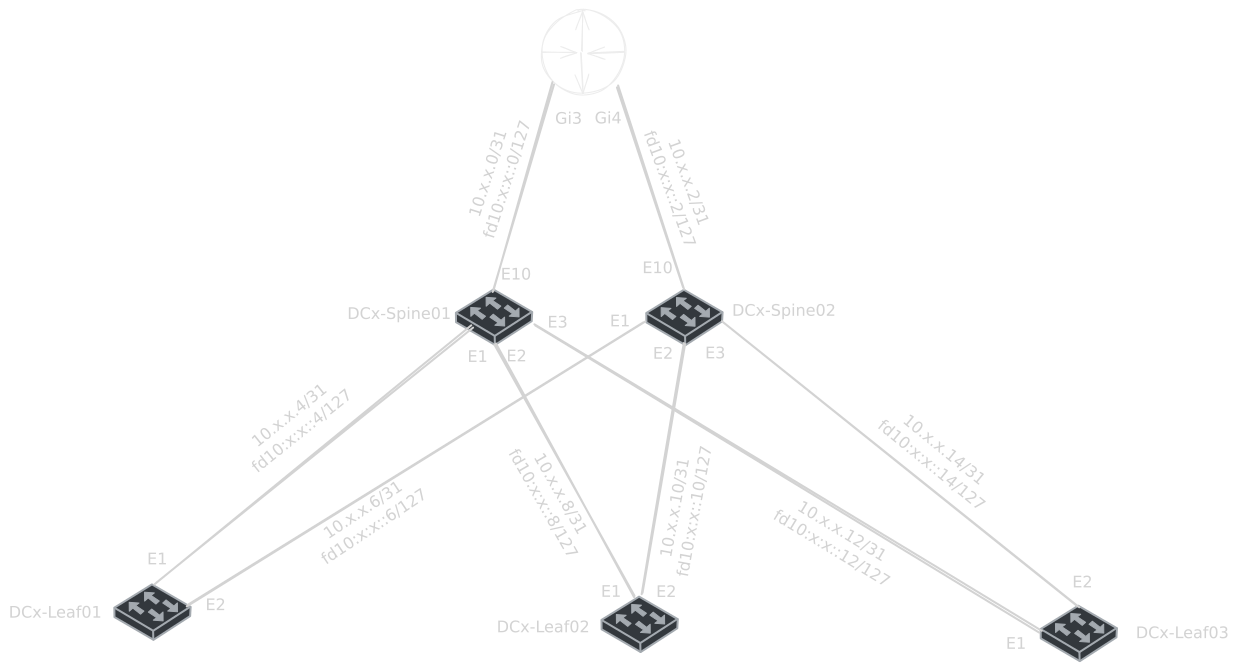
Each datacenter customer runs a leaf-spine EVPN/VXLAN fabric with K3s workloads.
The monitoring: a full observability stack (Prometheus, Loki, Grafana, OTel Collector) pulling inventory from a real Source of Truth (Nautobot), plus SuzieQ for historical state queries. When an alert fires, the system can ask “what did the BGP table look like 5 minutes before this happened?”
The AI NOC: NetClaw, an AI agent that receives alerts from Alertmanager, queries the monitoring stack and SuzieQ for context, and posts a root cause analysis to a diary, all without operator intervention for defined alert types.
What I hope to demonstrate by the end:
SoT-driven infrastructure: every device, IP, cable, and BGP session lives in Nautobot. Config templates, monitoring inventories, and investigations all query the same truth.
Failure detection across layers: a single link failure cascades through network (BGP/IGP reconvergence), transport (latency spike), and application (replication lag) layers, and the stack sees all three.
AI-assisted root cause analysis: when a PE-CE link drops, the agent doesn’t just report “BGP peer down.” It queries what the route table, LLDP neighbors, and interface state looked like before the alert, identifies the specific interface that failed, and reports whether traffic rerouted or the customer is isolated.
Configuration compliance: Nautobot Golden Config holds the intended state, detects drift, and the stack can remediate with assert-before-and-after validation via SuzieQ.
Reproducible by anyone: everything runs on a single Proxmox host with CML. No cloud accounts, no physical switches, no vendor licenses beyond the CML images.
The series is 10 parts. This is Part 1: we stand up Nautobot as the source of truth and populate it with the complete topology using a Design Builder job, so every subsequent part can query it programmatically instead of maintaining spreadsheets.
Why start with the Source of Truth
Every step that follows, configuring routers, deploying monitoring, wiring up AI investigation needs to know what devices exist, where they are, what IPs they have, and how they’re connected. Nautobot is the system that holds that data and makes it queryable by every tool in the stack.
Deploy Nautobot 3.2.1
1. Clone nautobot-docker-compose
cd ~
git clone https://github.com/nautobot/nautobot-docker-compose.git
cd nautobot-docker-compose
2. Pin Nautobot to 3.2.1
Edit pyproject.toml and set the Nautobot version:
[tool.poetry.dependencies]
nautobot = "3.2.1"
3. Add the apps
poetry add nautobot-design-builder
poetry add nautobot-bgp-models
poetry add nautobot-golden-config
poetry add nautobot-igp-models
This updates pyproject.toml and poetry.lock with all four apps and their dependencies resolved against Nautobot 3.2.1.
4. Enable the apps in nautobot_config.py
Edit config/nautobot_config.py:
PLUGINS = [
    "nautobot_design_builder",
    "nautobot_bgp_models",
    "nautobot_golden_config",
    "nautobot_igp_models",
]

PLUGINS_CONFIG = {
    "nautobot_plugin_nornir": {
        "connection_options": {
            "napalm": {
                "extras": {
                    "optional_args": {
                        "global_delay_factor": 1,
                        "transport": "ssh"
                    },
                },
            },
            "netmiko": {
                "extras": {
                    "global_delay_factor": 1,
                    "fast_cli": False,
                    "read_timeout_override": 30,
                    "disabled_algorithms": {"pubkeys": ["rsa-sha2-256", "rsa-sha2-512"]},
                },
            },
        },
        "nornir_settings": {
            "credentials": "nautobot_plugin_nornir.plugins.credentials.nautobot_secrets.CredentialsNautobotSecrets",
            "runner": {
                "plugin": "threaded",
                "options": {
                    "num_workers": 20,
                },
            },
        },
    },
    "nautobot_golden_config": {
        "per_feature_bar_width": 0.15,
        "per_feature_width": 13,
        "per_feature_height": 4,
        "enable_backup": True,
        "enable_compliance": True,
        "enable_intended": True,
        "enable_sotagg": True,
        "enable_plan": True,
        "enable_deploy": True,
        "enable_postprocessing": True,
        "sot_agg_transposer": None,
        "postprocessing_callables": ['nautobot_golden_config.utilities.config_postprocessing.render_secrets'],
        "postprocessing_subscribed": [],
        "jinja_env": {
            "undefined": "jinja2.StrictUndefined",
            "trim_blocks": True,
            "lstrip_blocks": False,
            "extensions": ["jinja2.ext.do"],
        },
        "default_framework": {"all": "netmiko"},
        "get_config_framework": {"all": "netmiko"},
        "default_deploy_status": "Not Approved",
    }
}
5. Build and start
invoke build --no-cache
invoke start
Wait ~2 minutes for migrations (the BGP/IGP/Golden Config models add database tables on first start), then verify:
curl -s http://localhost:8080/health/
Log in at http://<your-vm-ip>:8080. You should see:
Routing → BGP in the nav (BGP Models)
Routing → IGP in the nav (IGP Models)
Golden Config in the nav
Design Builder under Extensibility or Jobs
Why these four apps
AppWhat it gives youUsed inDesign BuilderDeclarative bulk data population from YAML templatesPart 1: populate the full topology in one job runBGP ModelsASN, BGP Routing Instances, Peer Groups, Peerings, Address FamiliesPart 2–3: model all iBGP/eBGP sessionsIGP ModelsOSPF/IS-IS instances, areas, interface configsPart 2: model the IS-IS underlayGolden ConfigIntended config generation, backup, compliance checkingPart 10: drift detection and remediation
All four have Nautobot 3.0+ compatibility releases.
Load the SP Demo Lab design
The Design Builder job lives in the jobs/ folder of nautobot-docker-compose. Nautobot picks up any Python job modules in that folder on startup.
Copy the design into the jobs folder
# From wherever you have the design files
cp -r sp_demo_lab ~/nautobot-docker-compose/jobs/
The structure inside jobs/:
jobs/
  sp_demo_lab/
    __init__.py          # DesignJob class + register_jobs()
    context/
      __init__.py        # All 28 devices, links, VRFs from addressing plan
    designs/
      0001_foundations.yaml.j2  # Locations, roles, platforms, device types, VRFs
      0002_devices.yaml.j2      # 28 devices with interfaces + IPs
      0003_cabling.yaml.j2      # Cables + P2P IP assignments
Restart to pick up the new job
cd ~/nautobot-docker-compose
invoke stop start
Run the design
Jobs → SP Demo Lab - Full Topology → Run
The job renders the templates with the context data and creates all objects
Re-running is idempotent. Existing objects are updated, not duplicated
What the design creates
Object typeCountDetailsLocations5SP-Demo-Lab (region), SP-Core, DC-A, DC-B, DC-C (sites)Device Roles7P-Router, PE-Router, Route-Reflector, CE-Router, Border-Router, Spine, LeafPlatforms2cisco_iosxe, arista_eosDevice Types2CAT8000v, vEOSDevices2813 Cisco CAT8000v + 15 Arista vEOSInterfaces~250Management, Loopback0, data interfaces per deviceIP Addresses~100Management, loopbacks, P2P /31 assignmentsPrefixes~20Management, SP core, DC fabricsVRFs4MGMT-VRF, CUST-A, CUST-B, CUST-CCables~40All inter-device links
Verify
UI quick checks
Devices → 28 total, filter by site to verify distribution
IPAM → Prefixes →
10.0.0.0/24has child /31sIPAM → IP Addresses → loopbacks and P2P links populated
Cables → all inter-device connections present
Routing → BGP → empty for now (Part 2 populates this)
Lifecycle management
Update: edit
context/__init__.pywith new devices or IPs, restart Nautobot, re-run the job → objects updated in placeDecommission: Design Builder → Deployments → select → Decommission → all objects from that run removed cleanly
Add a device: add it to the context list, re-run. No need to touch 4 different places.
What you have now
LayerStateNautobot 3.2.1Running with BGP Models, IGP Models, Golden Config, Design BuilderSoT data28 devices, full IPAM, cabling, VRFs populatedNetwork devicesManagement IPs up, no production config yetMonitoringNot deployed yet (Part 6)NetClawNot deployed yet (Part 8)
Next: Part 2, SP Core: IS-IS, MPLS, and BGP
Reference
nautobot-docker-compose: https://github.com/nautobot/nautobot-docker-compose
Design Builder docs: https://docs.nautobot.com/projects/design-builder/
BGP Models docs: https://docs.nautobot.com/projects/bgp-models/
Golden Config docs: https://docs.nautobot.com/projects/golden-config/
IGP Models: https://github.com/byrn-baker/nautobot-app-igp-models
Blog Sandbox: https://github.com/byrn-baker/blog-sandbox/